Features / Log Sets, Reps & Weight
Log Sets, Reps & Weight
Built for between-set speed: track weight, reps, RPE, and notes without fighting the UI. Rest timer keeps you on pace. Finished sets stay easy to scan so progressive overload is obvious.
How it works
Start a session (empty or from a template) and add the exercises you’re training.
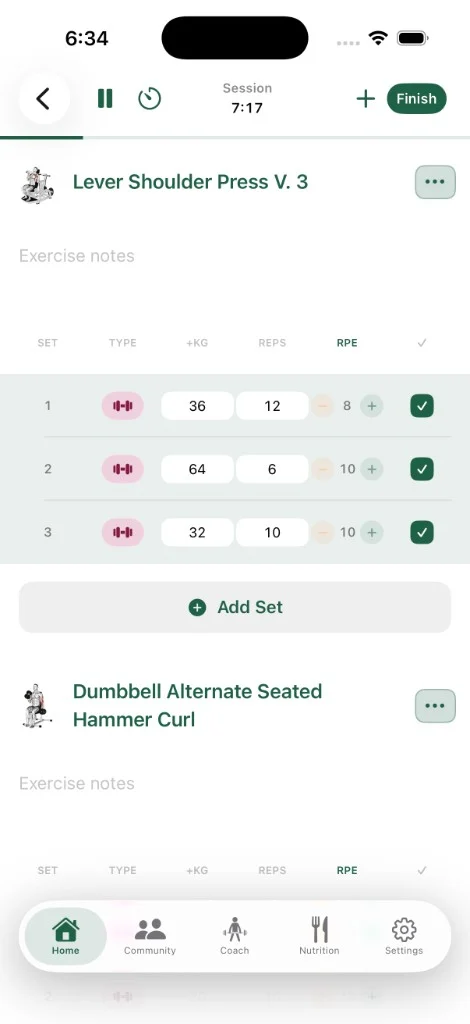
For each set, enter weight and reps. Enable RPE tracking in settings when you want effort logged per set.
Mark sets complete as you go—completed rows highlight so you can see progress mid-workout. Use the rest timer to stay on pace.
Tap Finish when you’re done to save the session, review what you earned, and update history, records, and badges.
FAQ
What can I log on each set?
Unlimited workout logging covers sets, reps, weight, and RPE. You can also add notes and use tools like the rest timer and plate calculator.
Does previous performance show up?
When you re-log an exercise you’ve done before, prior values help you push progressive overload instead of guessing.
Is logging free?
Yes—while zRep ships core logging unlocked, unlimited set logging is part of the free strength log experience described in App Store copy.